Settings is the page about you rather than about the clinic. Everything on it is a personal preference saved against your account: change it and nothing moves for anyone else. If you are looking for opening hours, price lists, or who is allowed to do what, that is Administration, not here.
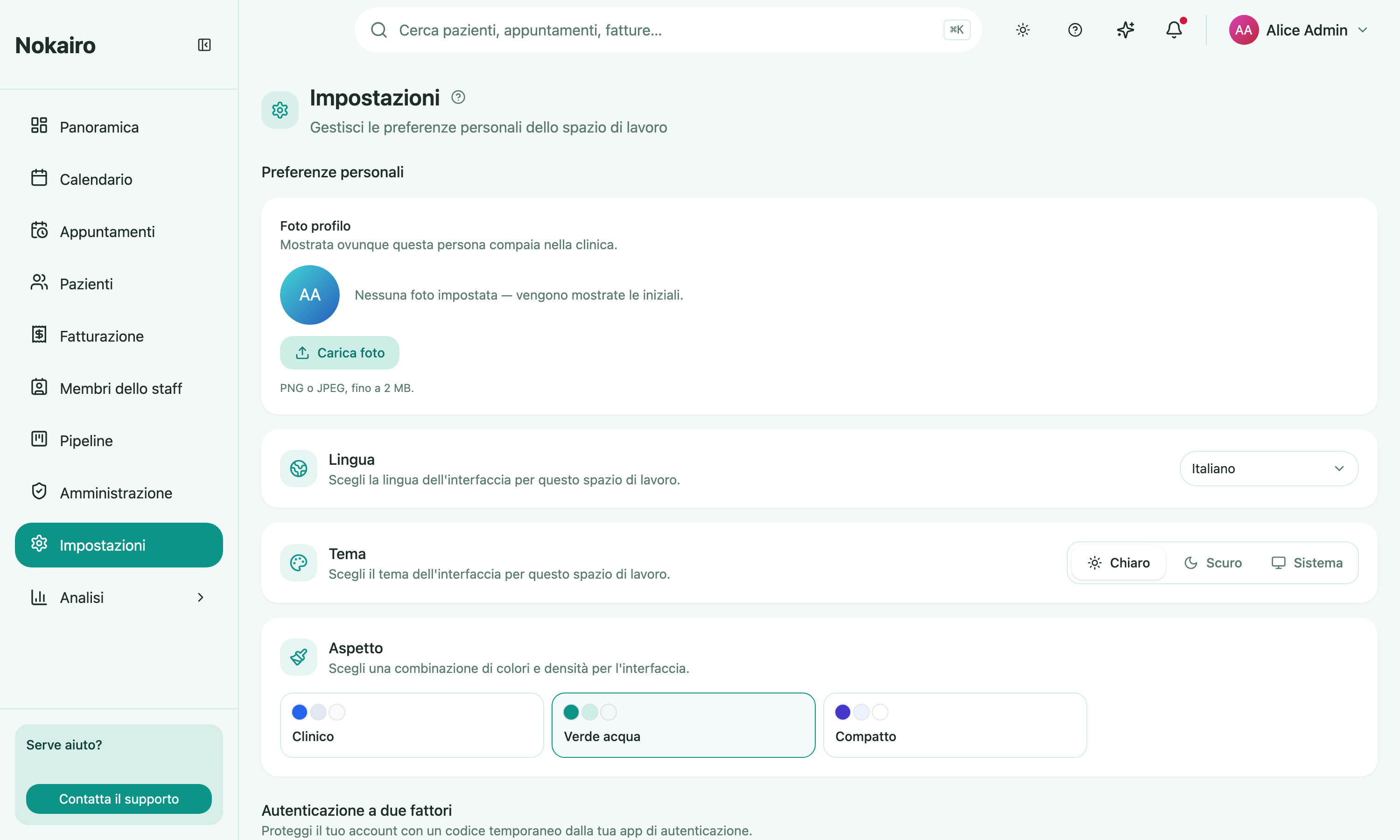
What you can do here
- Choose your interface language, English or Italian.
- Choose a theme — light, dark, or follow the system setting on the device you are using.
- Choose an appearance — one of four colour schemes and densities for the interface.
- Manage two-factor authentication: see whether it is on, when it was enabled, and how many recovery codes you have left; regenerate your recovery codes; or replace your authenticator app if you change phones.
Two-factor authentication
The two-factor section shows your current status and lets you change how you sign in. Both actions — regenerating recovery codes and replacing your authenticator — ask for your password first, because they are the actions someone with a borrowed session would want.
Recovery codes are each usable once and are shown only at the moment they are generated. Regenerating replaces the old set; the codes you did not save are gone, and the ones you already used do not come back.
Your preferences follow you, not the browser
These preferences are stored with your account, so they hold on any machine you sign in on. Signing in on the practice’s front-desk computer brings your own language and theme with you.
One thing that is not a preference: when you first arrive through an invitation link, Nokairo shows the inviting clinic’s language for that sign-up journey, so an Italian clinic’s invitation does not open in English. Once you are in, this page is what decides.