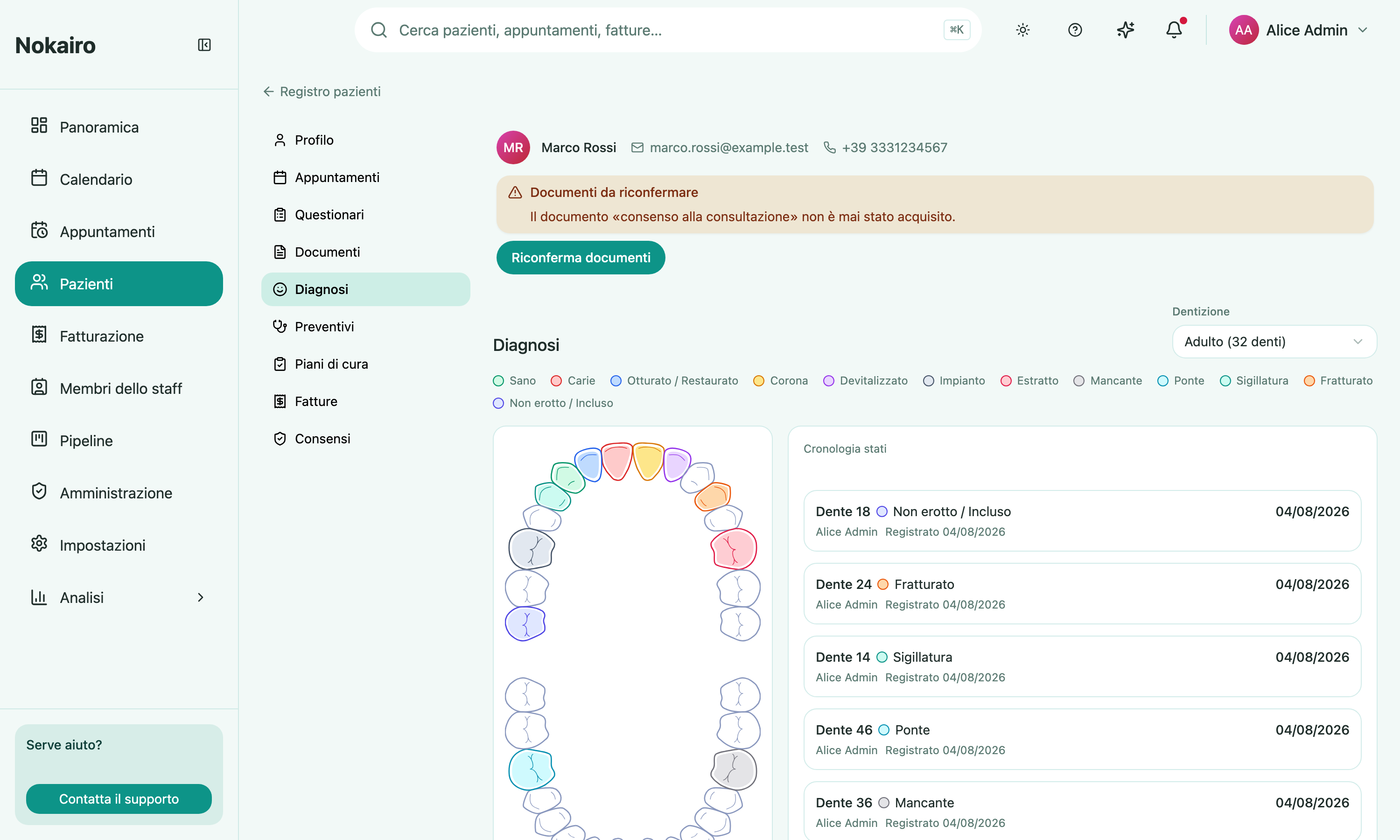
Diagnosis holds the patient’s odontogram: a dental chart on which each tooth carries a status. It is the clinical picture of the mouth as it stands, and a record of how it got there.
What you can do here
- See every tooth’s charted status at a glance, colour-coded, with a legend above the chart.
- Select a tooth to see and work with that tooth on its own.
- Record a tooth’s status, if you have the permission to manage care plans.
- Read the changelog of status changes across the whole chart.
Teeth are numbered in FDI notation. Hovering a tooth names it and gives its charted status, or tells you it has not been charted yet.
The statuses
A tooth can be charted as healthy, caries, filled or restored, crown, root canal treated, implant, extracted, missing, bridge, sealant, fractured, or unerupted or impacted. A tooth with no status recorded is not charted, which is not the same as healthy.
Adult and child dentition
The chart opens on the dentition the patient’s age suggests — child under six, adult otherwise — and you can switch between them. This choice only changes what you are looking at; it changes nothing on the record, and the chart returns to the age-based default next time it opens.
The panel beside the chart
With no tooth selected, the panel shows the changelog: the history of status changes on this chart. Selecting a tooth replaces it with that tooth’s own panel. Deselect to get the changelog back.