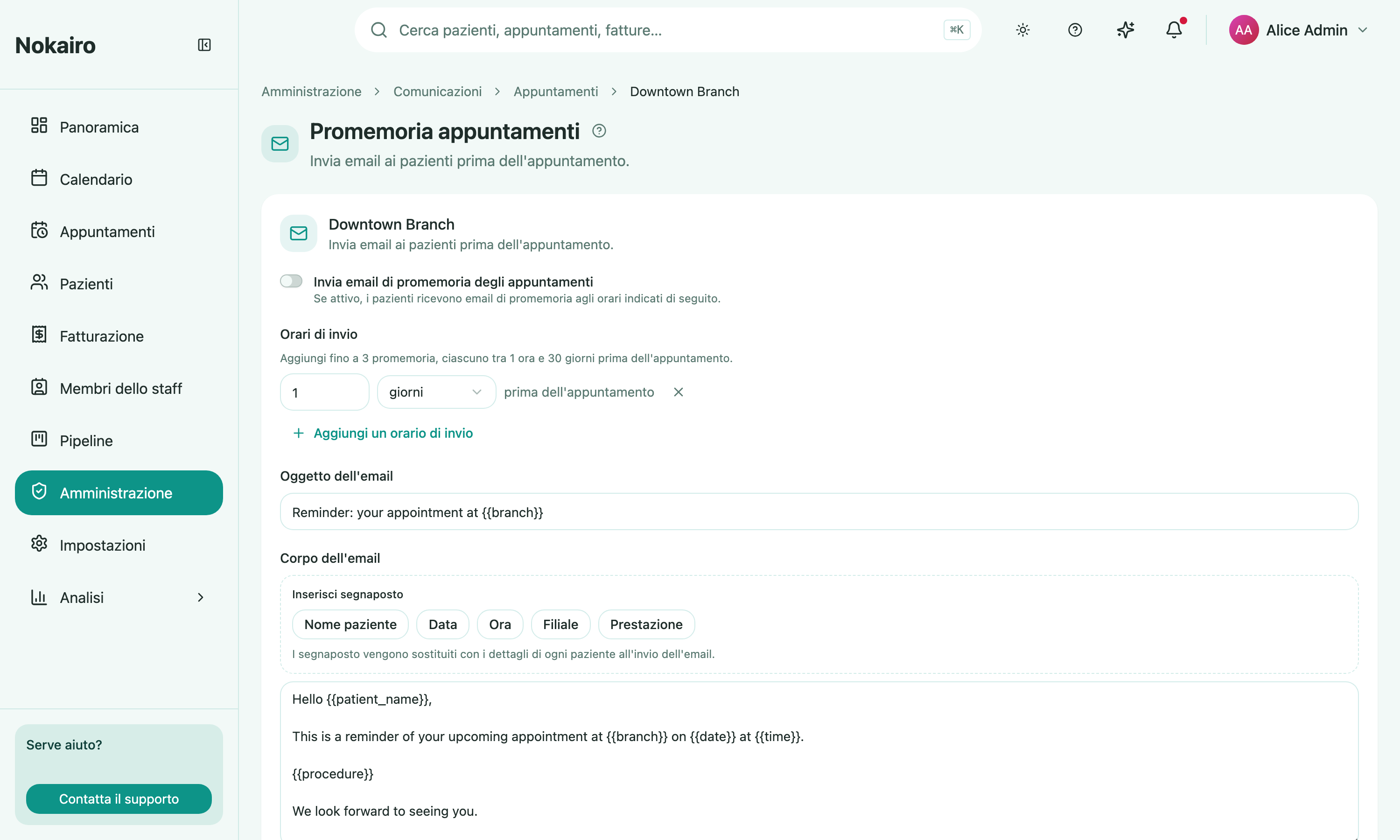
This is where a clinic writes the reminder email that reaches a patient before their visit, and decides how far ahead it goes out. You pick a branch first, then edit that branch’s reminders — each branch has its own switch, its own send times, and its own wording.
What you can do here
- Turn reminders on or off for the branch. With the switch off, nothing is sent.
- Choose the send times — up to three reminders, each between 1 hour and 30 days before the appointment. Two reminders cannot be set to the same moment.
- Write the subject and the body of the email.
- Insert placeholders into the body — patient name, date, time, branch, and procedure. Each one is replaced with the patient’s own details at the moment the email is sent.
When a reminder is not sent
The reminder goes out only for appointments that are still scheduled or confirmed, so a cancelled visit stops producing reminders. Each reminder is sent at most once for a given appointment and send time, even if the appointment is edited in the meantime. A patient with no email address on file cannot be reminded by email.
Patients can opt out
Reminder emails carry an unsubscribe link. A patient who uses it stops receiving reminders from that clinic, and the choice also applies to reminders sent over WhatsApp — it is one preference, not one per channel. Staff with the right permission can see that choice on the patient’s profile and reverse it there; it cannot be set from this page.