Some patients read a WhatsApp message and never open an email. This page lets a clinic move certain patient messages onto WhatsApp, one branch at a time. You pick a branch first, then set each message type for that branch.
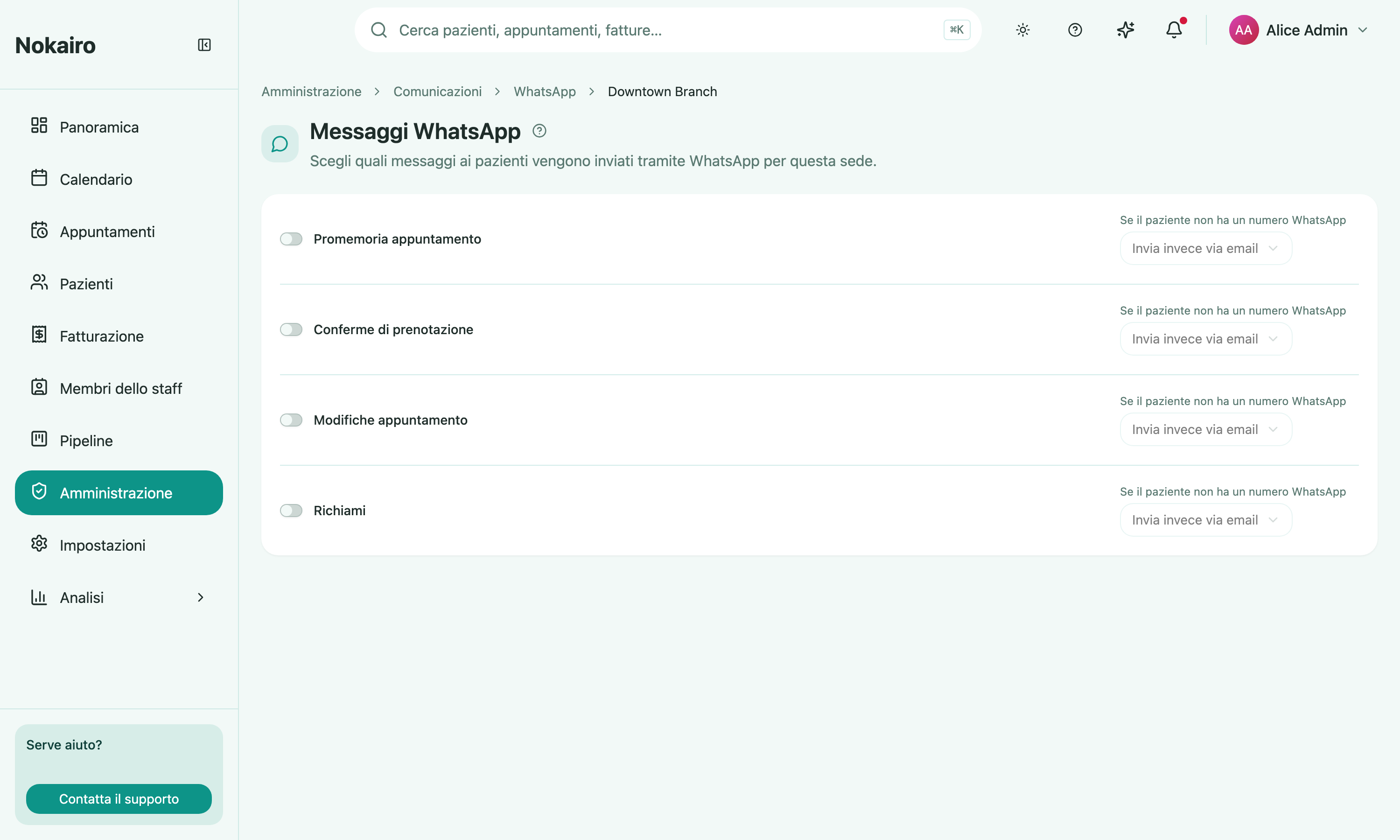
What you can do here
- Switch a message type onto WhatsApp — appointment reminders, booking confirmations, appointment changes, and recalls each have their own switch.
- Say what happens when the patient has no WhatsApp number — either send by email instead, or don’t send at all.
Each row saves on its own, as soon as you change it. There is no page-wide save button.
What you cannot change here
The text of a WhatsApp message is not written here. WhatsApp business messages use templates approved by the provider, so a message type whose template is not approved shows as unavailable and its switch cannot be turned on.
Timing also stays where it was: a reminder still goes out at the send times set under appointment reminders. This page decides the channel, not the schedule or the wording.
The connection comes first
These switches only carry messages once the clinic’s WhatsApp sender is in place, which is set up on its own Administration screen rather than here. If that connection lapses or is revoked, WhatsApp sending pauses until it is restored.
Opt-out is shared
A patient who unsubscribes from reminders or recalls stops receiving them on both channels. It is one preference per topic, not one per channel.