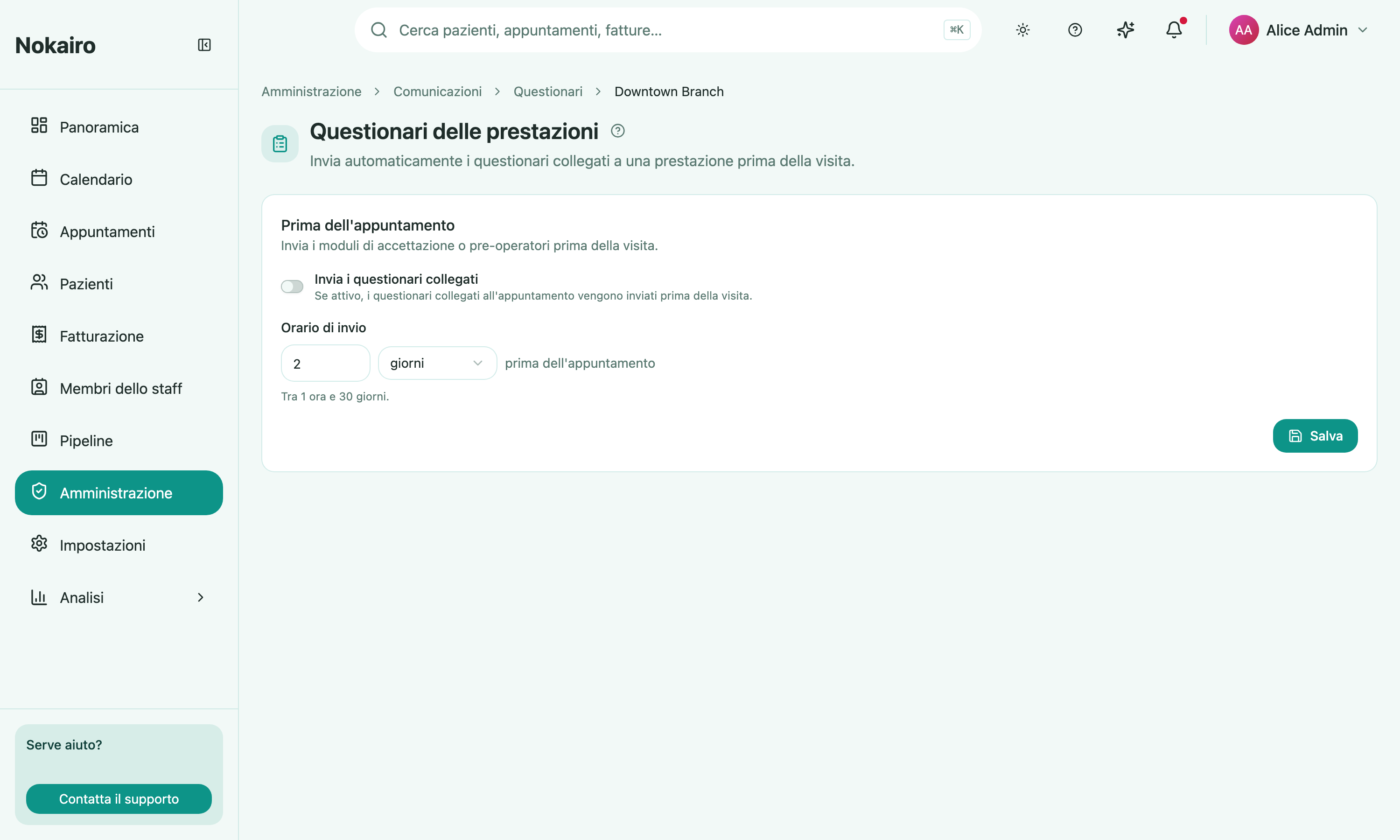
Some procedures need a form filled in before the patient arrives — an intake history, a pre-op questionnaire. This page lets a branch send those on its own, ahead of the visit, instead of handing a form over at the desk. You pick a branch first, then edit that branch’s setting.
What you can do here
- Turn “before the appointment” sending on or off for the branch.
- Set the send time — one moment, between 1 hour and 30 days before the appointment.
Which questionnaires go out
Nothing is chosen by name here. Nokairo sends the questionnaires already linked to the procedures on that appointment, in the procedure catalogue. An appointment whose procedures have no questionnaire linked to them sends nothing, however this switch is set. There is no subject or body to write: the patient receives the clinic’s questionnaire link.
When it is skipped
The send happens only for an appointment that is confirmed or checked in by the time the send time arrives, so a visit still awaiting confirmation does not produce one.
If a questionnaire is already being issued at booking, the procedure automation does not send it a second time. The page lists any such template with a sent at booking label, so you can see what this branch’s booking settings are already covering. That selection is made under booking confirmation.
After the visit
This page covers the run-up to the appointment only. There is no post-visit questionnaire send to configure here.