A booking confirmation is the email that reaches the patient as soon as their appointment is created — not a reminder ahead of the visit, but an acknowledgement that the slot is theirs. You pick a branch first, then edit that branch’s confirmation.
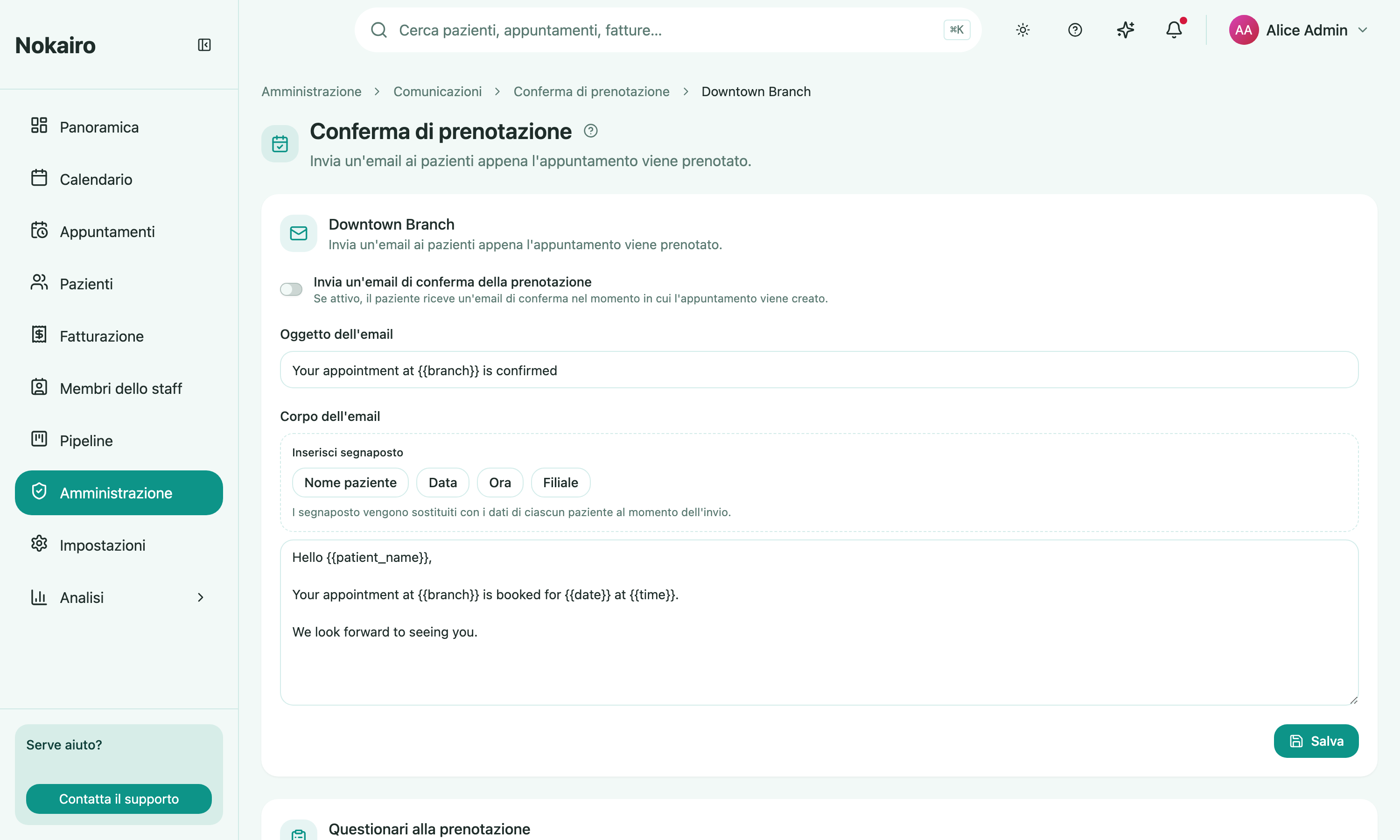
What you can do here
- Turn the confirmation email on or off for the branch.
- Write the subject and the body the patient receives.
- Insert placeholders — patient name, date, time, and branch — which are filled in with the patient’s own details when the email goes out.
- Send questionnaires at booking, in a second section on the same page.
Questionnaires at booking
Below the email editor, a branch can choose which questionnaire templates are issued to the patient when an appointment is booked. Add a template from the picker, and optionally mark it only for the patient’s first appointment so returning patients are not asked again.
This section has its own switch and its own save button, and works independently of the confirmation email: turning the email off does not stop the questionnaires. An archived template stays visible in the list but is no longer sent, and is labelled as archived.
How it relates to the other pages
The confirmation fires once, when the appointment is created. A later change of date or time is covered by appointment changes, and anything sent ahead of the visit by appointment reminders. A questionnaire already sent at booking is not sent a second time by the procedure questionnaires automation.