A patient recall is the message that goes to someone who has not been in for a while, inviting them back for a check-up. Unlike the other communications, it is not set off by anything happening in the clinic — Nokairo looks for patients who have gone quiet. You pick a branch first, then edit that branch’s recalls.
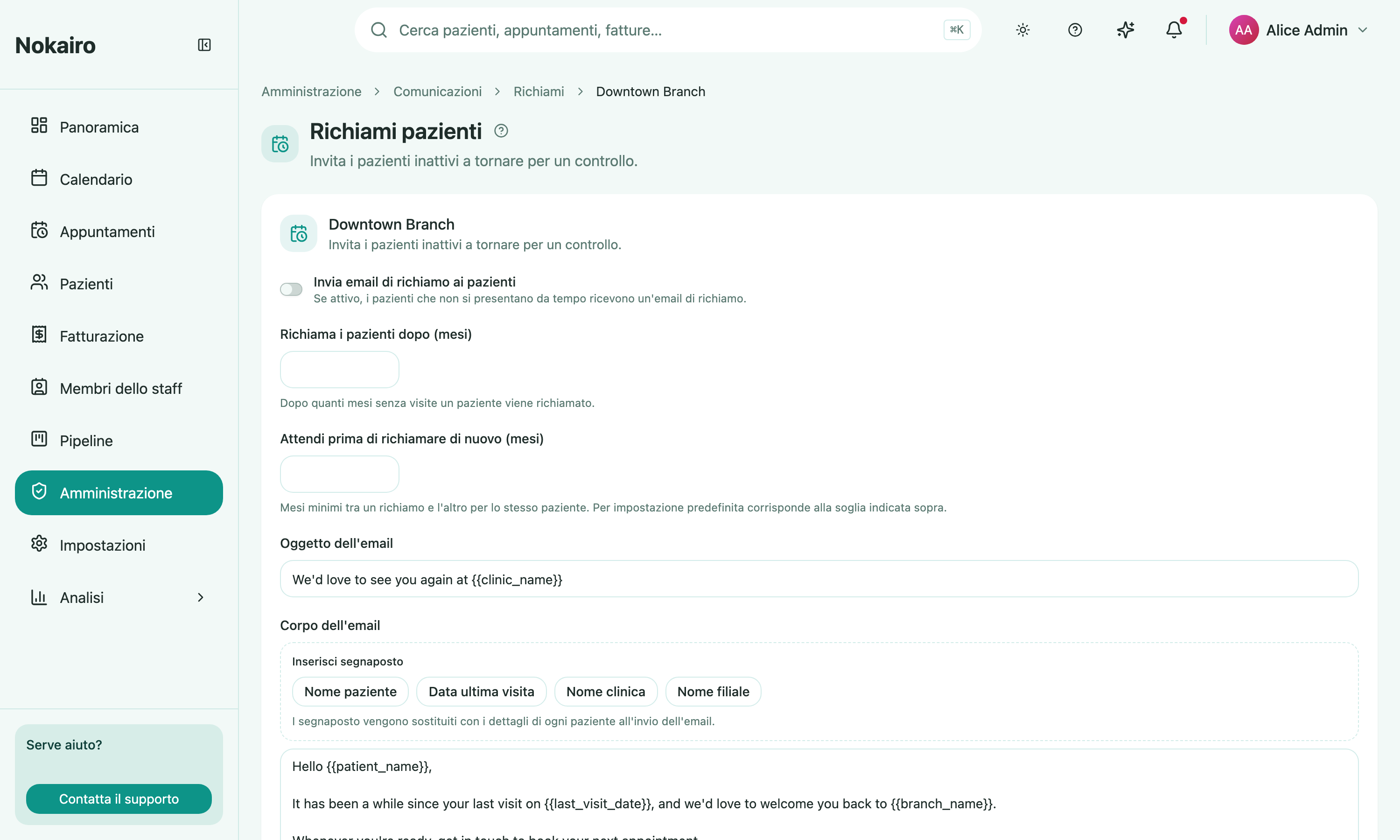
What you can do here
- Turn recall emails on or off for the branch.
- Set the inactivity threshold — how many months without a visit before a patient is recalled.
- Set the cooldown — the minimum months before the same patient can be recalled again. Left empty, it matches the threshold above.
- Write the subject and the body, with placeholders for patient name, last visit date, clinic name, and branch name.
How the sweep works
Once a day, Nokairo goes through the branches with recalls enabled and looks for patients whose last completed appointment there is older than the threshold. Because it runs on a daily pass rather than off an event, a change to these settings takes effect on the next pass, not the moment you save.
A patient is left out if they were already recalled inside the cooldown window, if they have no email address on file, or if they have unsubscribed.
Patients can opt out
Recall emails carry an unsubscribe link. A patient who uses it stops being recalled by that clinic, on email and on WhatsApp alike. Staff with the right permission can see and reverse that choice from the patient’s profile.
Per branch
The threshold, the cooldown, and the wording belong to the branch, and a patient’s inactivity is judged on their visits to that branch.