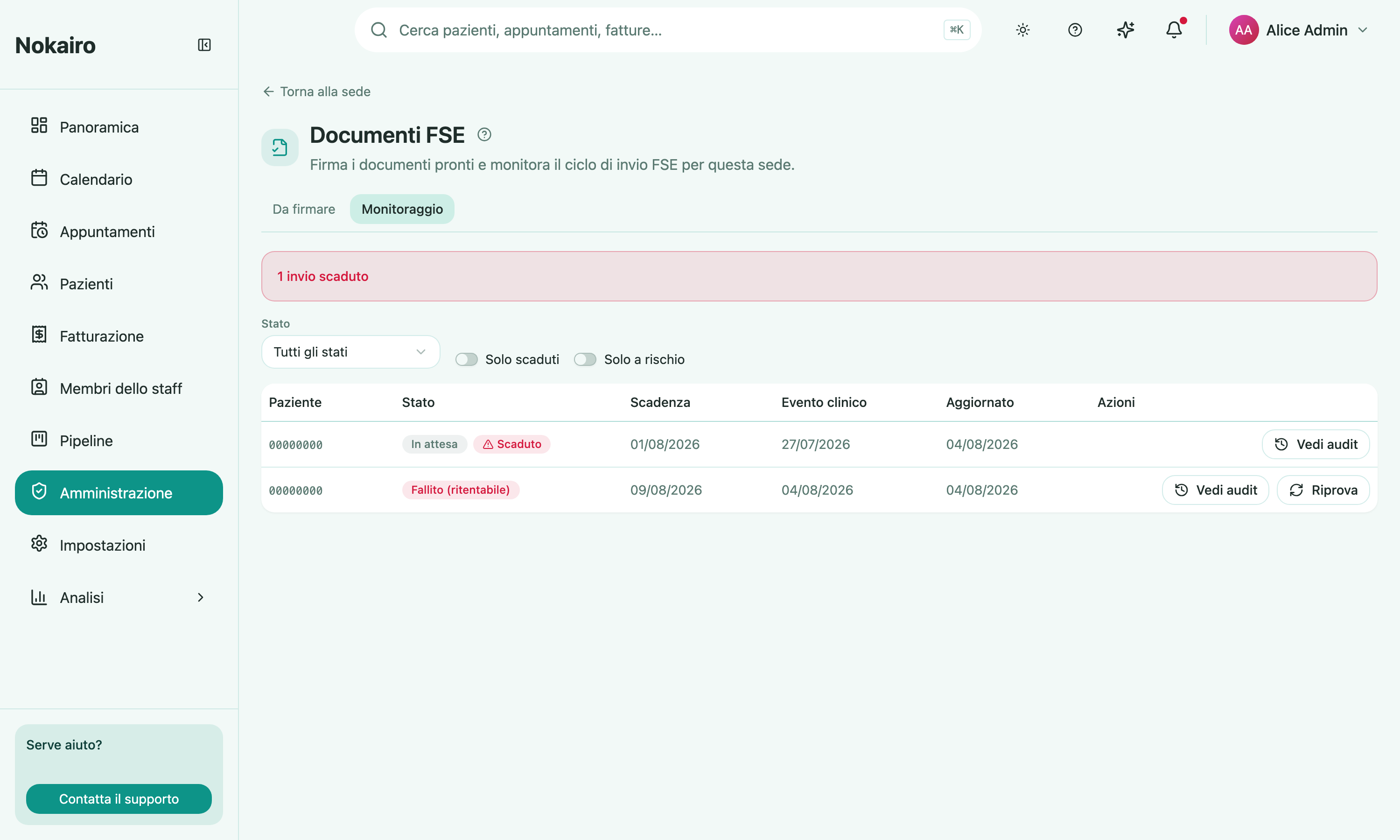
Nokairo prepares a clinical document for the FSE from the care a patient receives, then carries it through generation, validation, signing, and publication. This page is where a branch watches that pipeline and does the one step a person has to do: signing. It is reached from the branch detail page and has two tabs.
What you can do here
- Ready to sign lists the documents waiting for a signature, each with its care-event date and its submission deadline.
- Sign a document — the Sign button is active only on documents you personally are the signer for.
- Monitoring lists every document with its state, and filters by state, overdue only, or at risk only.
- Retry a document that failed in a retryable way, and annul one that was already accepted, stating a reason.
- View audit opens the trail of state transitions, with who or what caused each one.
Deadlines
Every document carries a submission deadline, and the list badges it as at risk or overdue as that date approaches or passes. Monitoring can sort overdue documents to the top, so the tab doubles as the branch’s worklist.
You can only sign your own
A document is signable by one specific practitioner — its author. If the Sign button is inactive for a document sitting in the queue, it is waiting for that colleague, not for you. Signing can also fail because the signing certificate has expired or is unavailable; that message points at an administrator, not at the document.
What this page will not do
It does not create documents — they arrive from clinical work. If a branch’s documents are stuck or blocked, the setup to check is the branch’s FSE structure identity, the author’s FSE identity, and the procedure’s FSE coding.