A medical quote records the treatments proposed to a patient and what they will cost. This section lists every quote on a patient’s record; opening one shows the quote in full and is where you edit it.
What you can do here
- Add a quote and build it up from treatments, each with a procedure, a quantity, an amount, the teeth it applies to, and a row note.
- Set the branch, the quote date, and a valid-until date.
- Download the quote as a PDF, or send it to the patient by email.
- Generate an invoice or generate an appointment from the quote.
- Delete a quote.
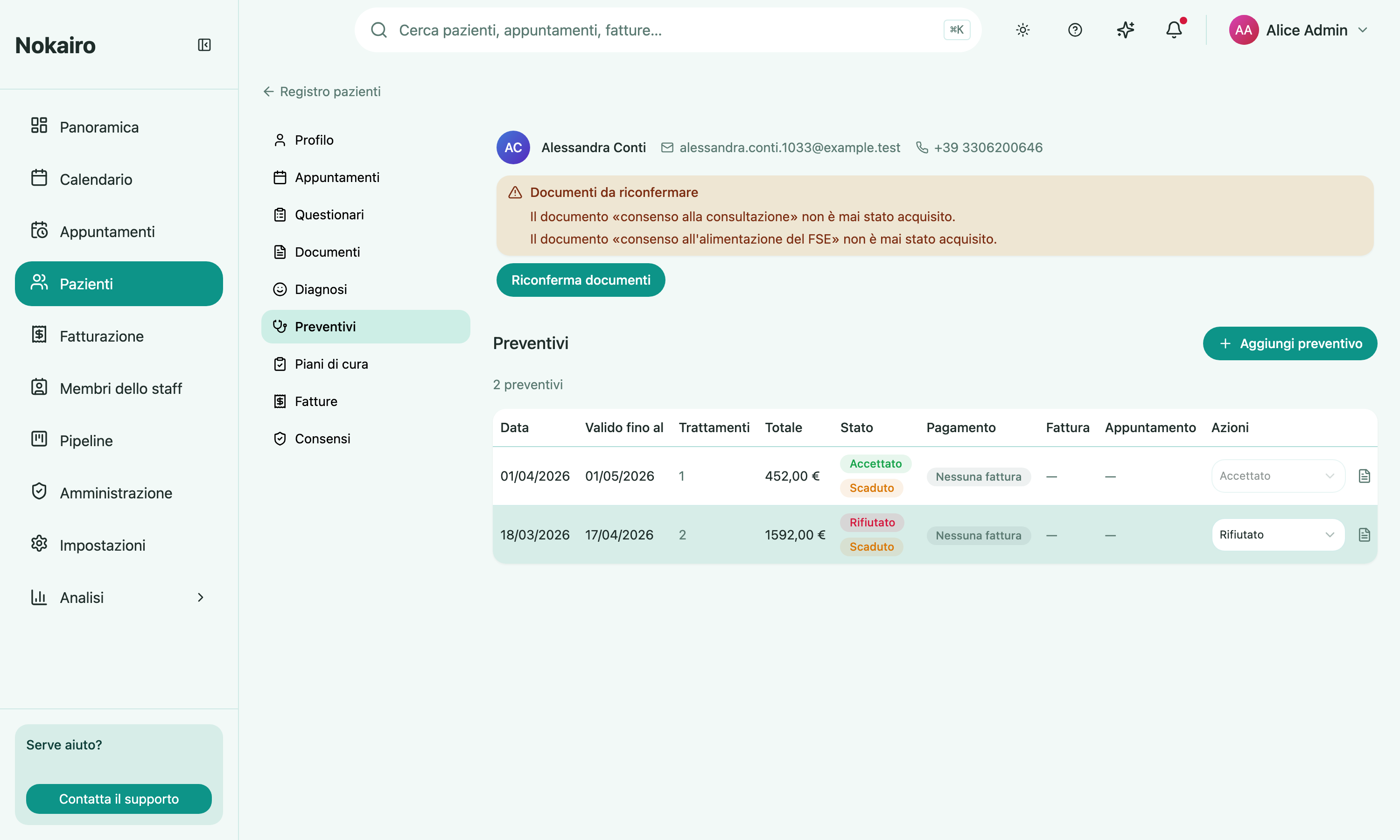
The list shows each quote’s date, validity, treatment count, total, status, and whether it has been paid or linked to an invoice.
The statuses
A quote is planned, rejected, or accepted, and it is shown as expired once its valid-until date has passed.
Accepted quotes are locked. Once a quote is accepted its fields can no longer be changed, because a care plan may already be built on it. Accepting cannot be undone by moving the status back — the only way out is to delete the quote. A rejected quote, by contrast, can be moved back to planned.
Signature
If the patient has signed the quote, the page shows who signed it and when. Signing happens through a link the patient opens themselves, not on this page.
What the quote connects to
A quote is the hinge between the clinical plan and the money. Generating an invoice from it carries its treatments across to invoices, and generating an appointment books the work in. An accepted quote can also be attached to a care plan, which is what tracks the treatments through to completion.